
Meeting Room / Facilities Booking System
A Meeting Room / Facilities Booking System helps teams reserve meeting rooms, desks, parking, and shared spaces in real time. It prevents double bookings, improves space utilization, and supports easy scheduling through web or mobile. Ideal for modern offices, it streamlines operations and enhances workplace efficiency.
-
Real-time
-
Scheduling
-
Automation
Get a free quote for Meeting Room / Facilities Booking System
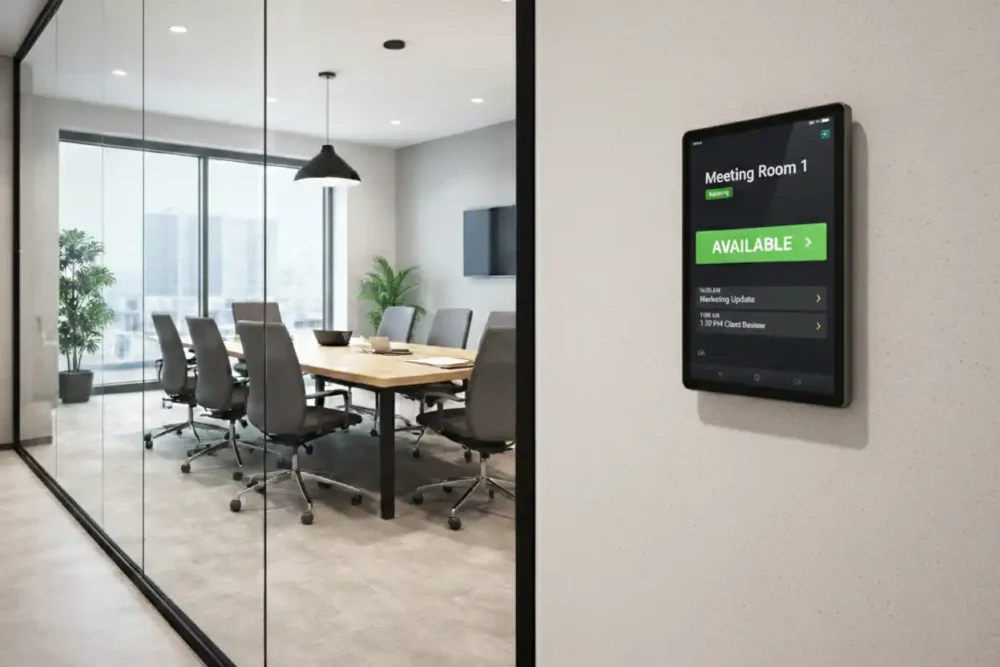
Office Space Scheduling
Trusted by venues worldwide, ID Vision Dubai offers a smarter way to manage meeting rooms and office facilities. Our Meeting Room / Facilities Booking System makes reservations simple, helping you improve occupancy, avoid double bookings, and streamline daily scheduling. With an easy search-and-book experience, users can quickly find available rooms and facilities, while admins gain full control with real-time availability, occupancy tracking, and detailed usage insights. The result is a smooth, integrated booking solution that saves time, reduces confusion, and improves space utilization.
Online Booking for Meeting Rooms & Spaces
Meeting Room / Facilities Booking System is the easiest way to organize meeting rooms, shared office spaces, and workplace facilities without confusion or wasted time. Instead of managing bookings through emails, spreadsheets, or manual coordination, this solution provides a single platform where users can check availability and reserve a space instantly.
With real-time scheduling, employees can search for available meeting rooms based on time, location, room size, or required equipment. This improves day-to-day productivity and eliminates common issues like double bookings, unused rooms, and last-minute clashes. For facility teams, the system offers a clear view of occupancy and space utilization, making it easier to manage resources and plan future requirements.
The Meeting Room / Facilities Booking System is ideal for booking boardrooms, training rooms, hot desks, interview rooms, shared workspaces, parking bays, and internal facilities. It also supports practical features like booking approvals, user permissions, reminders, cancellations, and reporting. These tools help administrators maintain control while keeping the booking experience smooth for employees.
For organizations focused on security and structured access, the system can be configured with role-based controls and optional integration with corporate identity or access control systems. This helps ensure that sensitive rooms and restricted facilities are booked only by authorized users.
Whether you manage a corporate office, co-working space, university, healthcare facility, or government department, this solution helps you improve space efficiency, reduce operational stress, and create a better workplace experience.
For enquiries, expert help, or product guidance on Meeting Room / Facilities Booking System, contact ID Vision:
Email: sales@idvisionme.com
Phone: +971 4 269 4620
Benefits of Using Conference Room Booking System
No More Double Bookings
A conference room booking system prevents overlapping meetings, ensuring one room hosts one meeting at a time, avoiding confusion, last-minute cancellations, and awkward situations between teams or employees.
Saves Time for Everyone
Employees can instantly check room availability and make bookings without walking around, calling admins, or sending messages, which streamlines scheduling and eliminates wasted time spent coordinating meeting spaces manually.
Better Use of Meeting Rooms
Unused or unnecessarily blocked rooms are minimized, and space is efficiently allocated. The system optimizes utilization, ensuring every meeting room is used effectively and reduces wasted office space.
Improves Productivity and Meeting Discipline
Meetings start and end on time, rooms are automatically released afterward, and features like auto-cancel for unattended bookings help maintain schedules and promote professional, disciplined meeting practices.
Easy Scheduling with Calendar Integration
Integration with Outlook, Google Calendar, or Microsoft Teams allows employees to book rooms directly while creating invites, ensuring seamless planning, avoiding conflicts, and simplifying the overall scheduling process.
Real-Time Room Status Display
Digital panels or software show current and upcoming meetings, availability, and room names in real-time, reducing confusion, enhancing office flow, and making it easy for employees and visitors to find free spaces.
Help Center
Frequently asked Questions - FAQs
Quick answers to questions about ePadLink electronic signature pads you may have. Can't find what you're looking for? Feel free to get in touch .
It is a digital tool that allows employees to check availability, reserve, and manage conference rooms or facilities efficiently, preventing scheduling conflicts and improving office productivity.
You can book a room through the system’s web portal, mobile app, or integrated calendar (Outlook, Google Calendar, Teams) by selecting the room, date, and time for your meeting.
Yes, the system allows you to easily cancel or reschedule meetings in real-time, ensuring the room becomes available for other employees without conflicts.
The system automatically updates room availability. Once a room is booked, it shows as unavailable to others, preventing overlapping meetings or scheduling errors.
Yes, many systems display current and upcoming meetings, occupancy, and availability on digital panels or apps, helping employees quickly find free spaces without checking manually.
Most systems offer analytics on room usage, peak hours, and no-shows, helping management optimize resources and plan future space requirements effectively.

